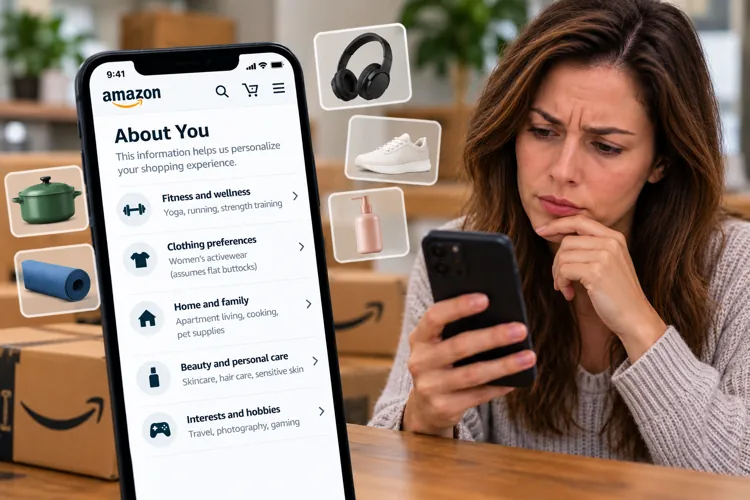

Amazon knows more than your shopping history: Its "About You" feature reveals personal preferences and assumptions used to recommend products.
Some shoppers are finding strange details: One woman reportedly discovered Amazon had described her body based on what may have been a clothing purchase.
Take back some control: You can review and remove information Amazon uses for recommendations, then use a few simple tricks to avoid impulse purchases.
Amazon knows what you've bought, what you've searched for, and what you've saved to your wish lists. But what if it also thinks it knows your body type, hobbies, family situation, and personal habits?
That's exactly what some shoppers are discovering after checking a little-known Amazon feature called "About You."
And while the feature raises some obvious privacy questions, Amazon is also creating a shopping profile on you in an attempt to get you to spend money on things you never planned to buy.
With Black Friday approaching, now might be a good time to see exactly what Amazon thinks it knows about you.
Amazon's surprisingly personal observations
According to a recent report from Malwarebytes, one shopper discovered that Amazon had described her as someone who "has flat buttocks." The woman suspected the observation came from a previous purchase of leggings designed to enhance that part of the body.
Let this serve as a reminder that Amazon isn't simply remembering what you purchased, but it’s also making assumptions about your interests and personal characteristics.
Amazon introduced About You in May 2026 to give customers more visibility into the information used to personalize their shopping experience. That information can come from your purchase history, product searches, reviews, saved lists, and even conversations with Alexa for Shopping.
Amazon says the goal is to help shoppers discover products they're more likely to want. But just because Amazon thinks you might like something doesn't mean you need it. And it certainly doesn't mean you're getting it for the best price.
How to see what Amazon knows about you
Checking your profile is free and should only take a few minutes.
On the Amazon mobile app:
Open the Amazon Shopping app and sign in
Tap the Me tab at the bottom
Tap your name
Select "About You"
On a desktop computer:
Sign in to Amazon
Hover over your name above "Account & Lists"
Click your name or select a shopping profile
Click "About You"
You can also try going directly to Amazon's About You page after signing in.
Once there, explore categories such as Home and Family, Interests and Hobbies, Brands, and Product Preferences.
You may discover that Amazon has made assumptions based on something you purchased years ago, a gift you bought for someone else, or a product you were simply researching.
How to clean up your profile
If you spot something inaccurate, outdated, or just plain weird, Amazon lets you remove it from your personalization preferences.
Open the category containing the information, select the entry, and choose "Remove." Confirm your choice when prompted. That tells Amazon you don't want that particular information used to personalize your shopping experience.
But there's an important distinction. As Malwarebytes points out, removing an assumption from About You doesn't necessarily erase the underlying purchase or browsing history that helped Amazon make it.
And Amazon doesn't make any mention of a master switch that turns off the entire feature.
Ways to keep Amazon's recommendations from costing you money
Cleaning up your profile is a good start.
But the bigger money-saving opportunity comes from changing how you respond to personalized recommendations.
Shop from a list, not Amazon's suggestions. Before opening the app, write down what you actually need. If Amazon recommends something that isn't on your list, don't buy it immediately. Give yourself 24 hours to decide whether you really want it.
Don't assume a personalized recommendation is the best deal. Amazon might know you prefer a certain brand, but that doesn't mean it's the cheapest option. Compare similar products, check unit prices, and look at competing retailers before buying.
Check price history before clicking "Buy Now." Tools such as Keepa and CamelCamelCamel can help you see whether an Amazon price is genuinely low or just looks attractive. Setting a price alert can also help you avoid buying something simply because it's being promoted.
Amazon's About You feature isn't necessarily a bad thing as more relevant recommendations can make shopping easier. But there's a difference between helping you find something you need and convincing you to buy something you hadn't considered.
So, it’s worth the five minutes to check your Amazon profile. You might be surprised by what the retailer thinks it knows about you and what it’s planning on trying to sell you next.