

Shoppers can now check price history on multiple items at once, easily compare products, and even avoid fake “sale” prices without leaving Amazon.
Price alerts can help curb impulse buying as users can set target prices and let Alexa notify them when the price is right — or even buy it automatically.
Alexa can now analyze photos you take and recommend cheaper alternatives. For the DIY’er, it can help you troubleshoot broken appliances and electronics.
Amazon’s AI shopping assistant is quietly turning into something much bigger than a voice assistant that tells you the weather.
The latest version of Amazon’s Alexa+ for Shopping now helps users compare products, track price history, set automatic purchase triggers, build shopping guides, and even monitor deals across the web. And for shoppers trying to avoid overpaying online, some of the new features are surprisingly useful.
Here’s how consumers can actually use Alexa’s shopping tools to save money and shop smarter.
Echo device no longer required, or a Prime account
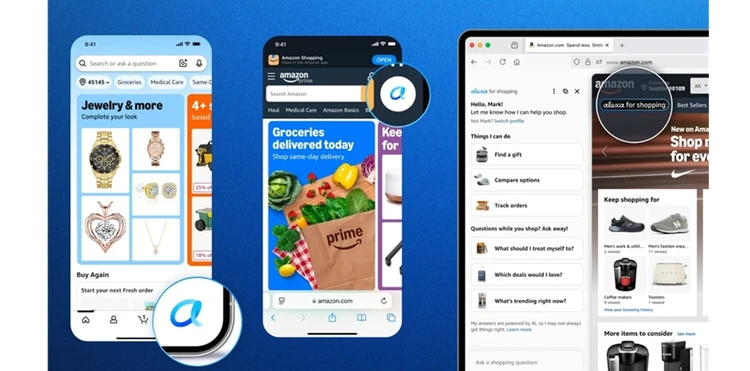
To take advantage of this new technology, you just need to be signed into your Amazon account. You don’t need a Prime membership, an Echo device, or the Alexa app to make it happen.
All you have to do is tap the Alexa icon in the bottom navigation bar in the Amazon app, or you’ll find it at the top of your screen when on a laptop or desktop.
Use price history before buying anything expensive
One of the most useful new features is Alexa’s built-in price history tracking.
Shoppers can now ask Alexa:
- “Has this item been cheaper recently?”
- “What’s the price history?”
- “Has this gone on sale before?”
Alexa will then show:
- 30-day pricing history
- 90-day pricing history
- Full 365-day pricing trends
That matters for shoppers because many Amazon “sales” are not really sales at all. A product marked “25% off” today may have sold for the exact same price two weeks ago.
The nice thing is that when you’re looking at five possible gift ideas, Alexa will show the price history on each. This is a new feature and a huge time saver when looking for a real deal.
Pro tip: Use price history especially on electronics, kitchen appliances, vacuums, coffee makers, and headphones. Those categories tend to fluctuate constantly on Amazon.
Set price alerts instead of panic-buying
Setting targeted price alerts just might be the best feature for deal hunters.
Users can now tell Alexa:
- “Alert me when this drops below $50”
- “Buy this when it hits 30% off”
- “Purchase this when it falls to $15”
Alexa will monitor pricing automatically and either:
- Send an alert
- Or complete the purchase automatically using your default payment method
That removes a lot of the obsessive “checking prices every day” behavior many shoppers fall into. And it can prevent impulse buying simply because something looks temporarily discounted.
Compare products side-by-side faster
Amazon also added AI-powered product comparisons directly inside their search results.
So, instead of opening 14 browser tabs trying to compare things like coffee makers, laptops, vacuums, and headphones, Alexa can now summarize major differences in:
- Price
- Features
- Reviews
- Weight
- Battery life
- Waterproofing
- Materials
This feature alone can save shoppers a surprising amount of time and frustration.
Pro tip: Use comparisons to eliminate bad options quickly instead of endlessly researching tiny differences between similar products.
Use Alexa to avoid forgetting recurring household purchases
One underrated feature is Scheduled Actions.
Alexa can now automate repetitive shopping tasks like:
- Reordering pet food
- Restocking paper towels
- Buying detergent
- Refilling protein bars
- Tracking new book releases
This can help families avoid expensive last-minute purchases at convenience stores or grocery stores where prices are often much higher. For example, running out of paper towels unexpectedly may cost twice as much locally compared to buying in bulk online ahead of time.
You can also say things like, “Add this dog food to my cart if the price drops below $35 and I haven’t purchased it in over 30 days.”
Upload photos to find cheaper alternatives
I have to admit that this is a pretty cool new feature. Alexa can now analyze your uploaded photos and help you find similar products.
For example:
- Upload a photo of a handbag
- Snap a picture of a chair
- Screenshot shoes from social media
Then ask Alexa to:
- “Find something similar under $100”
- “Find cheaper versions”
- “Compare similar styles”
This can be especially useful for avoiding overpriced influencer products or trendy impulse buys.
Amazon is known for cheaper versions of more expensive name-brand items. So by being able to analyze your photos, they can help you easily find products that have a very similar style, but cost significantly less.
Something break? Ask Alexa for help
For a DIY’er like myself, this might be the single best feature of Amazon’s new shopping feature.
Here’s a scenario that you’ll inevitably come across:
- Your clothes dryer suddenly stops heating.
- You type into the Alexa for Shopping search bar: “Why is my dryer blowing cold air?”
- Since you previously ordered a replacement lint filter for your Samsung dryer through Alexa+, it already knows the exact model you own.
- Alexa for Shopping explains that the issue is commonly caused by a tripped thermal fuse or clogged vent line on that model and walks you through a few troubleshooting steps to try before scheduling a repair.
- After cleaning out a heavily clogged exterior vent, the dryer starts heating normally again.
Be careful with automatic purchasing
While the convenience is impressive, it’s smart to be very cautious with your “auto-buy” settings.
If left unchecked, automatic purchasing can easily lead to:
- Overspending
- Duplicate purchases
- Subscription-style shopping habits
- Buying things simply because they hit a sale price
Just because something gets cheaper does not necessarily mean you still need it.
Pro tip: Create price alerts only for items you already planned to buy anyway. Otherwise, the “deal” itself becomes the reason for spending money.