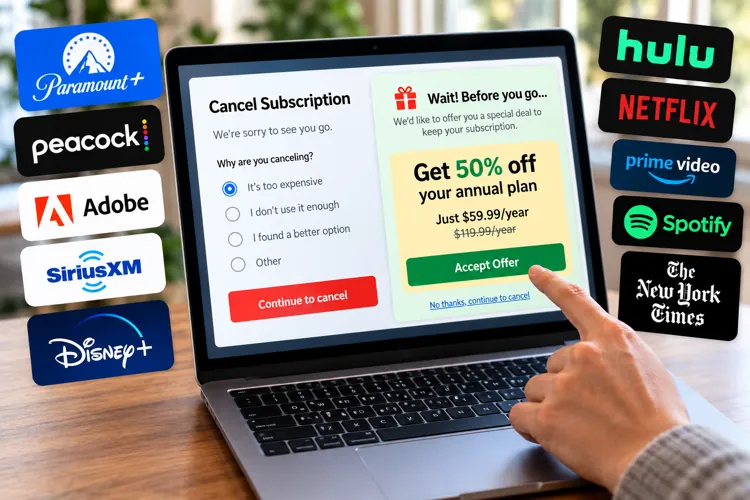

Don't automatically renew: Before paying another year of a streaming service, software subscription, or membership, start the cancellation process and see what happens.
Look for the second offer: Some companies may offer a lower price, free months ,or a cheaper plan to keep you from leaving.
Do the math: A “special offer” isn't necessarily a good offer. Compare the total cost over the same 12-month period.
If you've ever watched your cable bill magically shrink when you threatened to cancel, there's a digital version of the same trick hiding inside some subscription accounts.
Before allowing an annual subscription to automatically renew, log into your account, find the cancellation option, and start walking toward the exit. Don't necessarily cancel it. Instead, just see what the company offers you to stay.
It's called a retention offer, and depending on the subscription and customer, it might be a discounted rate, several free months, a cheaper plan, or nothing at all.
And recent reports from subscribers suggest the savings can be substantial. In September, for example, multiple Paramount+ customers reported being offered 50% off an annual subscription while attempting to cancel. One subscriber said the offer didn't even appear immediately, but it popped up after sitting on the cancellation page for roughly 30 seconds.
While there’s no guarantee, checking can take less than a minute, and if your alternative is automatically paying full price for another year, it's always worth a shot.
Don't click the final button
Here's the safest way to try it. Whether it’s Peacock, Hulu, Disney+, HBO Max, SiriusXM, YouTube TV, Audible, or The Wall Street Journal, log directly into the subscription's website or app and find Account, Membership, Billing, or Manage Subscription.
Choose the option to cancel or end your membership and proceed through the screens slowly.
Often times companies will ask why you're leaving. If there's an option like a “too expensive,” “cost,” or “I don't use it enough,” that's the smartest answer if price really is the reason you're considering leaving.
Then sit back and watch what happens.
You’ll often see one of the following:
A discounted monthly or annual rate
One or more free months
A temporary promotional price
An option to pause instead of cancel
A cheaper subscription tier
Pro tip: Read every screen before clicking. There's a big difference between clicking “Continue cancellation” and “Confirm cancellation.” If you want to keep the service regardless of whether you're offered a deal, stop before the final confirmation unless you're certain you can easily resubscribe.
Don't assume the first offer is a good one
Here's where consumers can get fooled.
A giant “SPECIAL OFFER” banner doesn't mean you're actually saving much.
One Peacock subscriber recently reported attempting to cancel a $109.99 annual Premium subscription and being offered $2.99 a month for three months, followed by $10.99 a month.
That sounds pretty good when you focus on the $2.99. But over 12 months, that works out to $107.88, which is just $2.11 less than the $109.99 annual price.
That's why you should ignore the advertised percentage or introductory monthly price and calculate the total cost for the next 12 months.
Pro tip: Open your phone's calculator before accepting anything. Multiply the promotional price by the number of discounted months, add the regular-price months that follow, and compare that number with your renewal price. A retention offer can be a deal without being a good deal.
Try this before your renewal date — not after
Timing matters.
Don't wait until you notice a $139 charge on your credit card. Set a reminder for about two weeks before every annual subscription renews.
That gives you time to:
Check the upcoming renewal price.
Look at how much you've actually used the service.
Search for current promotions.
Start the cancellation process and look for a retention offer.
Compare the offer with competing services.
Cancel if the numbers no longer make sense.
This turns automatic renewal into an annual price negotiation instead of something that quietly happens to your credit card.
Take a screenshot of any offer
If you get a good retention offer, screenshot it before accepting it. Specifically, be sure to capture the price, length of the promotion, and what happens when the promo ends.
For example, you might see a promo like this: $4.99/month for six months → $13.99/month thereafter. That second number matters just as much as the first.
Next, I recommend putting the promotional expiration date on your calendar, so you know when to revisit.
The Federal Trade Commission specifically advises consumers taking promotional subscription rates to know when the promotion ends, what they'll be charged afterward, and to mark that date on their calendars.
Be careful with annual contracts
There's one big exception to the “try canceling” strategy worth noting. Some pesky subscriptions can charge you an early termination fee if you’re not paying attention.
Adobe is a good example. Adobe says U.S. customers on certain annual plans that are paid monthly can face an early termination fee equal to 50% of the remaining contract balance if they cancel after the initial 14-day period.
So don't assume that annual plan, paid monthly, means month-to-month subscription. They're not necessarily the same thing.
Before testing the cancellation flow, determine whether you're merely stopping an upcoming renewal or breaking an existing contract.
Pro tip: Look for the words “annual commitment,” “early termination fee,” “remaining contract balance,” and “cancellation fee” before proceeding.
Sometimes canceling really is the best deal
There's a psychological trick behind retention offers that's easy to miss.
The company's goal is to get you thinking: “Look how much I'm saving.”
But your question should be: “Would I buy this subscription today for this price?”
Those aren't the same thing. For example, a service dropping from $120 to $70 doesn't save you $50 if you barely use it. It costs you $70.
So before accepting the deal, look at your usage. If you haven't watched the streaming service, opened the app, or used the membership in months, the biggest discount is still the cancel button.
One more trick: Think beyond streaming subscriptions
This strategy can potentially work anywhere a company has a financial incentive to keep you on as an existing customer.
Think about all the following services:
Internet service
Satellite radio
Home alarm companies
Digital newspapers
Pest control services
Cloud storage
Fitness apps
Meal kit delivery services
The offers and cancellation rules can vary dramatically from one service to another, so don't assume you'll always get a discount.
But before blindly paying another annual renewal, it's worth spending 60 seconds finding out whether the price you were about to pay was really the best price available.