

Best Self-Monitored Home Security Systems of 2026

Skip professional monitoring and save on monthly costs

Don't like scammers? You won't like burglars either. See your best security system.

Join over 8,000 people who received a free, no obligation quote in the last 30 days.
Enter details in under 3 minutes

Don't like scammers? You won't like burglars either. See your best security system.

SimpliSafe
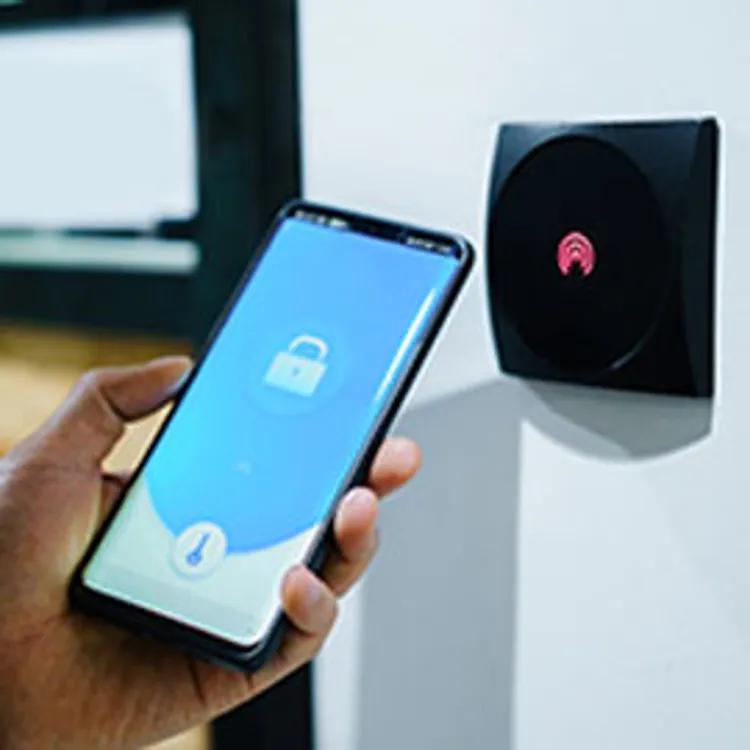
person unlocking their house with home security app

Self-monitoring your home security system gives you more control over how you handle alerts and eliminates the high fees associated with professional security systems. While these systems are reliable when maintained properly, you are responsible for monitoring events and calling for help if a threat is real.

Our picks for the best self-monitored home security systems

Compare our top self-monitored security systems

All our picks offer do-it-yourself installation and flexible self-monitoring plans.

More details about our top 3 picks

To choose our top picks, we started with a list of popular home security companies, then compared features, costs, ratings and reviews to narrow it down to the best options. We prioritized self-monitoring systems with camera integration. All prices are accurate as of publication.

Easy setup

SimpliSafe

SimpliSafe
Monthly self-monitoring fee
$9.99
Equipment costs
$150.56 to $440.30
Compatible with
Amazon Alexa, Google Home, August Locks

We like the versatility of SimpliSafe. It’s one of the better home security companies overall and has great camera options. If you choose SimpliSafe for self-monitoring, you’ll find its app to be very intuitive, even if it’s your first security system. It’s easy to arm or disarm your system remotely and connect your smart devices to create automation.

SimpliSafe is “easy to set up and install” and has “reasonable pricing for components,” according to Shawn in Ohio. Hugh in Arizona had similar feedback: “This system is so easy to install,” and “so affordable (under $300 for my needs).”

Moreen in Nevada told us SimpliSafe is “better than ADT” because “no monitoring contracts required! Put it in myself in minutes … No tech knowledge needed. Love it, and the money saved!”

Self-monitoring with camera recordings costs $9.99 per month. You get unlimited camera recordings and alerts, but no emergency dispatch.

It’s possible to forgo a monitoring plan entirely and simply keep track of the system yourself for free. You still can access basic app features (view the live video feed or arm and disarm the system) as long as you have an internet connection, but you won’t have the historical data needed to investigate past events.

We don’t recommend this option because you might lose all of your system information, like what happened to Harvey in Arizona:

“After a recent price increase to the subscription monitoring, I made the decision to cut the umbilical cord, and begin self monitoring. … I was informed that I could indeed still use the mobile app to interactively perform these actions. To my amazement, after cancellation, when I opened the mobile app on my iPhone, all system information had been deleted. I am very disappointed.”

Value

Ring

Ring
Monthly self-monitoring fee
$4.99 to $9.99
Equipment costs
$179.99 to $359.99
Compatible with
Honeywell and Alexa-enabled devices

Ring stands out for its affordability combined with highly customizable, expandable DIY systems. It works well if you want to start small and expand later with more cameras, sensors or smart-home devices.

Ring has great video and sound quality, according to Jessica from North Carolina, who also highlighted that systems are easy to install and affordable. “Clear video day or night, right to your phone no matter where you are at,” Jorge in Illinois said.

“My Ring doorbell and security camera works great and the app is easy to download, set up and use,” Norma in California told us.

“The overall security system is great because it allows you the ability to connect between different devices. I am able to connect my outdoor floodlight camera with the Ring mobile app and my doorbell camera. It's also great you can connect it to your Amazon Alexa device to view who is at your front door,” Cameron in California said.

With self-monitored systems, it's important to strike a balance between value and cost. While the base alarm kits offer affordability, costs increase quickly if you opt for additional accessories. If you have a tight budget, we recommend visiting Ring's website and thoroughly comparing the options.

Ring offers a range of starting kit costs, spanning from $179.99 to $359.99. Each package includes essential components like a base station, keypad, entryway sensor and motion detector. You can further customize your system with extra cameras, glass-break sensors, smart doorbells, lights and more.

  • With the Basic plan ($4.99 per month), you get video recording for one Ring doorbell or camera, plus access to the app to arm and disarm the system.
  • With Plus ($9.99 per month), you get video recording for multiple Ring devices at one location, plus extra digital features through the app.

» COMPARE: Ring vs. SimpliSafe

Wired cameras

Xfinity Home

Xfinity Home
Monthly self-monitoring fee
$10
Equipment costs
$360 to $600
Compatible with
xFi Gateway, Xfinity camera devices

Xfinity Smart Home systems are easy to set up and use, but they’re less compatible with third-party devices than Ring and SimpliSafe. With an Xfinity system, you can choose from equipment packages or shop a la carte to design the perfect security system for your home. We like that the wired self-monitored home security systems come with HD live video, night vision and two-way audio.

Multiple happy customers told us how much they like using the app. Ann in Connecticut specifically highlighted the weather map, notification features and ease of use.

“I love the 24/7 recording and often save videos of things I deem strange. I also love it pulls the cameras up on my TV through my cable box. I love the night mode feature which means if any sensor is tripped, the alarm will go off without warning which is great to put you on alert instantly … I can also arm, etc from any device with the app in case I forget, which is cool,” Helen in Illinois said.

Corky in Illinois said: “XFINITY home security is convenient and a great product for the amount you pay. I only wish that it worked with Amazon Alexa and my digital door locks.”

Total equipment costs are on the higher end, ranging from $360 to $600. Systems also require a subscription to Xfinity Internet, which is only available in the following states and Washington, D.C. — and even then, it’s not available in all areas.

  • Alabama
  • Arizona
  • Arkansas
  • California
  • Colorado
  • Connecticut
  • Delaware
  • Florida
  • Georgia
  • Illinois
  • Indiana
  • Kansas
  • Kentucky
  • Louisiana
  • Maine
  • Maryland
  • Massachusetts
  • Michigan
  • Minnesota
  • Mississippi
  • Missouri
  • New Hampshire
  • New Jersey
  • New Mexico
  • New York
  • North Carolina
  • Ohio
  • Oregon
  • Pennsylvania
  • South Carolina
  • Tennessee
  • Texas
  • Utah
  • Vermont
  • Virginia
  • Washington
  • West Virginia
  • Wisconsin

» COMPARE: Xfinity vs. ADT Self Setup

Pros and cons of self-monitoring

Self-monitoring is a proactive approach to home security. Because these systems aren't connected to emergency response centers, you don't have to worry about false alarm fines or high monthly service fees. However, the responsibility for taking action during an emergency rests entirely with you.

“You have only yourself to count on to get any alerts that come up, decide how important they are, and then call for help if needed. That’s a lot of pressure. If you can’t be available for that kind of self-monitoring 24/7, it can totally be worth it to pay a little more each month,” according to Rebecca Edwards, lead reporter at SafeWise.

Pros

  • Less expensive monthly costs
  • Instant notifications to your phone
  • Remote access and system control
  • Fewer false alarms
  • Customizable equipment

Cons

  • More personal responsibility
  • Reliance on mobile device signals
  • Limited professional support
  • No automatic emergency dispatch

Don't like scammers? You won't like burglars either. See your best security system.

How to choose a self-monitored security system

The most essential feature of a self-monitored system is the app, according to Edwards. “If you truly want to self-monitor, the most important thing is full, free access to the mobile app and all alerts and notifications,” Edwards said. “If you can’t get that, you should go for a system with affordable pro monitoring. Without mobile access, you’ve basically got the equivalent of a car alarm looking after your house, pets and loved ones.”

Your system’s reliability largely depends on the quality of the components, including sensors, cameras and the central control panel. Systems typically rely on an internet connection to send alerts and notifications. If you experience frequent internet outages or interruptions, they may impact performance.

Without mobile access, you’ve basically got the equivalent of a car alarm looking after your house, pets and loved ones.”
— Rebecca Edwards, lead reporter at SafeWise

If video monitoring is important to you, check whether the system supports security cameras and offers cloud or local storage for recorded footage. Consider factors like video quality, storage capacity and any associated costs.

» COMPARE: Best DIY home security systems

FAQ

Are there self-monitored home security systems with no monthly fees?

Yes, but they are limited. Most companies charge a nominal fee for app access and video storage. What you’re really paying for is how well your equipment connects to the app.

SimpliSafe and a few other systems may offer essential features that work without a monthly subscription. These fees are almost always more affordable than the costs of a professionally monitored home security system.

» FIND: The cheapest home security systems of 2026

Can you DIY a self-monitoring system without paying for an app?

It’s possible but complicated. You would need significant technical knowledge to configure your own notifications and surveillance hardware. For most users, paying the small monthly fee for a polished app (like Ring’s $4.99 plan) is worth it for the reliability.

» COMPARE: Best DIY home security cameras of 2026

How do self-monitored security systems work?

Besides who gets the alerts, these work just like every other security system. Motion detectors, glass-break sensors or other devices detect potential threats. When triggered, the system sends you a notification and/or sounds an alarm.

Using an alarm system without monitoring is like having a security guard dog at home, but no one watching over it. When the dog senses trouble, it barks. You go outside — assuming you hear the alert — assess the situation and call the police if the threat is real. Your dog can't call the police, so you must rely on your judgment and response to handle any potential danger.

When a sensor detects something unusual, like a door opening or movement inside your house, it triggers a loud alarm or flashes lights to grab attention. You’re responsible for hearing the alarm, checking the cameras or physically investigating and calling help if necessary.

» MORE: Security system installation: DIY versus professional

Bottom line

Self-monitored security systems are an excellent way to protect your home on a budget, but their effectiveness depends on the quality of your equipment and internet connection.

Our picks for the best self-monitored alarm systems are SimpliSafe for ease of use, Ring for the best customizable value and Xfinity for its robust wired camera options. A traditional security system with professional monitoring, such as ADT or Frontpoint, might be a better fit if the pressure of responding to 24/7 alerts feels overwhelming.
Did you find this article helpful? |
Share this article