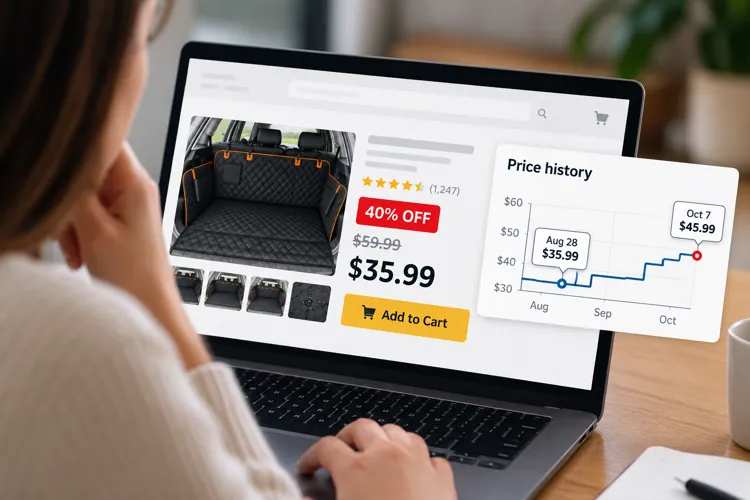

Check the price history: Tools like CamelCamelCamel and Keepa can show whether a Black Friday price is actually unusually low.
Ignore the percentage off: A “40% off” badge means a lot less if the product was selling for the same price — or less — a few weeks ago.
Don't trust your cart: An item's price can change after you add it to your Amazon cart, so check it again before buying.
Amazon's big October sale is over but it can now be used to give shoppers an important preview of Black Friday. And the biggest takeaway isn't about potential deals — it's about how easily shoppers can be fooled into thinking they're getting one.
Around major Amazon sales, shoppers have noticed something very frustrating: Items sitting in their carts can change price when the sale begins and often the price will actually go up.
In one widely-shared example from a previous Prime Day, a shopper said a cart worth roughly $400 before the event jumped to about $540 once Prime Day started.
Another shopper reported seeing an $8 notebook increase to $14, only to receive a Prime Day “discount” that brought the price back down to around $8.
And during Amazon's October 2025 sale, a Reddit user documented a dog cargo liner priced at $35.99 before Prime Day. During the event, the displayed price was $45.99 with a 22% Prime discount, bringing the price right back to $35.99.
That doesn't necessarily prove Amazon is intentionally raising prices to manufacture discounts. It’s well-known Amazon prices change constantly, and many products on its marketplace are sold by third-party sellers who set their own prices.
But it does offer an important warning as Black Friday approaches: Never judge a deal by the percentage-off. Always check the price history instead.
A price tracker can expose a not-so-great deal

This may be the easiest Black Friday trick most shoppers aren't using.
Before buying something on Amazon, paste the product URL into CamelCamelCamel. The free Amazon price tracker shows a chart of the item's price history, making it much easier to see whether today's “sale” price is actually low compared with what it has sold for previously.
Keepa is another tool that can show price history on supported products and retailers, and its Droplist feature can watch an item for you and alert you when the price falls.
You can also find the “Price History” button right on the product page on Amazon (see screenshot above). Just click it and you’ll get the item's price history from the last month, three months, and one year.
This information can completely change how a deal looks.
Imagine a television is advertised on Black Friday like this:
Regular price - $699
BLACK FRIDAY DEAL: $499 — SAVE $200
Sounds fantastic. But pull up the price history and you might discover that television sold for $479 three weeks earlier.
Suddenly that “$200 savings” doesn't look nearly as impressive.
Pro tip: Watch out for Black Friday-only model numbers. Some retailers sell special versions of TVs, laptops, and appliances during holiday sales. They might look nearly identical to regular models but have fewer features or sub-standard specs. Before buying, always compare the actual specs. — not just the brand and screen size.
Your Amazon cart doesn't lock in the price
There's another reason to check the price history immediately before buying: Just because you add something to your Amazon cart doesn't mean you lock in its price. If the price changes before final checkout, you'll have to pay that price.
Amazon may alert you to a price change in your cart, but during a huge sale, it's easy to focus on a “Prime Deal” or “Black Friday Deal” badge rather than remembering exactly what the product cost when you first added it.
That's why simply loading your Black Friday wish list into your Amazon cart isn't enough.
Pro tip: When Black Friday finally arrives, don't go directly from your cart to checkout. Run your expensive purchases through a price tracker first. It takes less than a minute and helps you determine immediately whether you're actually getting a good deal or not.
The number that matters isn't '40% off'
There will be plenty of legitimate bargains on Black Friday and Cyber Monday.
But Prime Day offers a useful reminder that prices move constantly and a giant percentage-off badge doesn't tell you what an item was actually selling for last week.
Fortunately, you don't have to remember! You just need to remember to check a price tracker before you checkout.
Because the most important number on Black Friday isn't “40% off.” It's what the product actually cost before the sale started.
Three more shopping tips worth remembering
When it comes to Black Friday shopping on Amazon, here are a few more things to keep in mind.
Check the price before Black Friday week. If there's an expensive item you know you want, take a screenshot of its price now, including the date. When Black Friday arrives, you'll have your own reference point instead of relying entirely on Amazon's advertised savings.
Don't let a coupon fool you. Some Amazon discounts require you to check a coupon box on the product page before adding the item to your cart. Others only apply when you use a specific promo code. Make sure the discount actually appears in your order total before clicking Buy.
Check for a better deal in another color. Amazon is notorious for pricing different colors or styles of the exact same item differently. So, before buying headphones, kitchen appliances, water bottles, luggage, shoes, or clothing, click through the available colors and styles. You might find the identical item for significantly less simply by choosing a different color.