


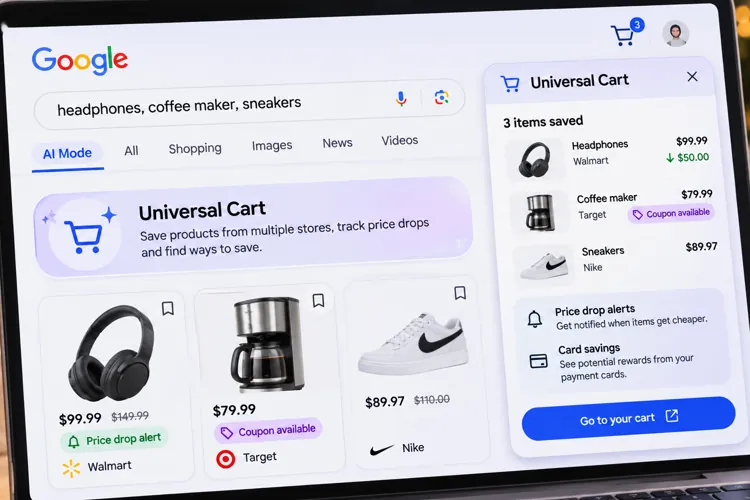

One cart for multiple stores: Keep track of products from Walmart, Target, and other retailers without juggling a dozen browser tabs.
Find savings you might otherwise miss: Google can alert you to price drops, uncover promo codes, and identify credit card perks.
Just in time for Black Friday: The new shopping tool is rolling out across Google Search and Gemini in the U.S.
If you're the type of shopper who opens 15 browser tabs comparing prices before buying something, Google has a new tool you'll probably want to try.
It's called Universal Cart, and it could change how you shop this Black Friday.
Instead of keeping separate shopping carts at Walmart, Target, Sephora, and other stores, Google's new AI-powered cart lets you save products from different retailers in one place.
The interesting thing about the cart is that doesn't just remember what you're shopping for. It can actually help you find ways to pay less. Google officially launched Universal Cart in the U.S. on October 15, with availability rolling out through Google Search and the Gemini app.
Here's how to put it to work.
Build your Black Friday shopping list now
Let's say you're shopping for a new coffee maker, headphones, and a pair of sneakers.
Normally, you'd visit three different retailers, bookmark products, or leave items sitting in separate shopping carts.
With Universal Cart, you can save products from participating retailers while shopping through Google's Shopping tab using their Search AI Mode or Gemini.
The handy part is that everything stays together, even if you switch between Google's shopping experiences.
How to try it: Open Google Search's AI Mode or the Gemini app and look for products you're considering. If Universal Cart is available on your account, use its cart option to save items.
The trick is to start building your list before Black Friday so you can start tracking prices now, rather than waiting until November 27.
Let Google watch for price drops
This might be Universal Cart's most useful feature for bargain shoppers. Once you've saved products, Google can monitor their prices and notify you when something gets cheaper.
For example, say you add a $150 pair of headphones to your cart today. If the price drops to $99 during Black Friday week, Google could alert you to the $51 savings.
The technology uses Google's Shopping Graph, which contains more than 60 billion continually refreshed product listings.
It can also notify you when something that's sold out comes back in stock.
Pro tip: Add expensive items you're considering now. That gives you more time to watch for price changes instead of assuming the advertised Black Friday price is the best deal.
Find coupons you didn't know existed
Here's a feature that could save shoppers money without much effort. Universal Cart can identify relevant promotional codes for products you've saved.
That means you might discover an extra discount that wasn't obvious when you first found the item. It can also use information from Google Wallet to identify potential savings or rewards associated with your payment cards.
For example, if one card offers additional cash back at a particular retailer, Google could help you recognize that benefit before checkout.
Pro tip: Check both the available promo codes and your credit card rewards before buying. Sometimes the best savings come from combining an advertised sale with an additional offer, when the terms allow it.
Check out without starting over
When you're ready to buy, Universal Cart can simplify checkout at participating retailers.
Google says shoppers can use Google Pay for eligible purchases or transfer products directly to a retailer's website to finish their order.
Participating merchants include Walmart, Target, Nike, Sephora, Ulta Beauty, and Wayfair, along with numerous Shopify stores.
One important distinction: Universal Cart isn't necessarily one giant checkout for every retailer. Purchases still go through the participating merchants, which remain responsible for orders and customer service.
Three things to watch out for
Before relying on Universal Cart for all your Christmas shopping, keep the following in mind:
Not everyone may see it immediately. Google is rolling out the feature, so availability can vary.
A price-drop alert doesn't guarantee the lowest price. Compare the final cost, including shipping and any discounts available directly from the retailer.
Don't forget about return policies. Even when you check out through Google, the retailer handles your purchase and your potential return. Be sure you’re comfortable with their return policy before you complete your purchase.
Universal Cart won't magically make everything cheaper. But if it helps you catch a price drop, discover a forgotten coupon, or use the right credit card, it could become a valuable Black Friday shopping tool.