

ConsumerAffairs used ChatGPT to analyze a suspicious email, which immediately flagged it as a likely scam due to fake “safe sender” language, awkward phrasing, and lack of legitimate branding.
The message contained classic phishing tactics, including a vague “view document” link and bait like a “Q2 bonus,” designed to trick recipients into clicking without verifying authenticity.
ChatGPT determined the goal was credential harvesting — redirecting users to a fake login page to steal passwords — and advised deleting the email, avoiding the link, and securing accounts if credentials were entered.
The message in the inbox looked suspicious right away. Something about it just didn’t look right.
To make sure, ConsumerAffairs pasted the contents (below) into ChatGPT and asked it to determine if the message was legitimate.
ChatGPT’s advice? “Treat this as a scam.”
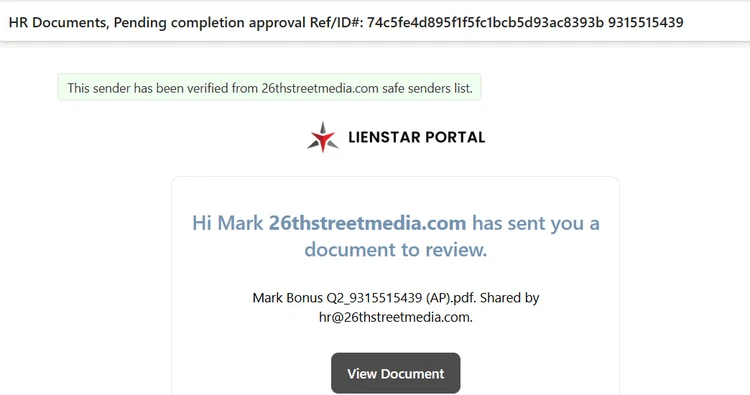
Here's what ChatGPT told us:
🚩 Major red flags in what you pasted
1. Fake “safe sender” reassurance
“This sender has been verified from 26thstreetmedia.com safe senders list.”
That line is not something Microsoft adds in a trustworthy way.
Attackers often inject fake trust language to lower your guard.
Real verification usually looks like:
“Via” headers (e.g., via SendGrid)
Microsoft’s built-in banners—not custom wording like this
ChatGPT also picked up on “odd, unnatural phrasing,” as well as missing punctuation, awkward structure, and the fact that it looks like a template, bot message. It noted that legitimate services like DocuSign and SharePoint are always polished and branded.
Also, there was a generic “view document” lure, with no explanation of what the document is, which ChatGPT described as “classic phishing behavior.”
Ask yourself:
Do you actually work with this company?
Were you expecting a “Bonus Q2” document?
If not, this is almost certainly: impersonation + lure attachment/link
Note the reference to “Q2 bonus.” Scammers love to use bait like:
Bonuses
Invoices
HR docs
Payroll
These often work because people click quickly without thinking.
So, we asked ChatGPT what the scammers are trying to gain. It identified the pitch as a credential-harvesting phishing email that will:
Take you to a fake “document viewer.”
Ask you to log in (Microsoft/Google).
Steal your password.
What to do
Do NOT click “View Document”
Delete the email
If you entered credentials:
Change your password immediately
Enable 2FA