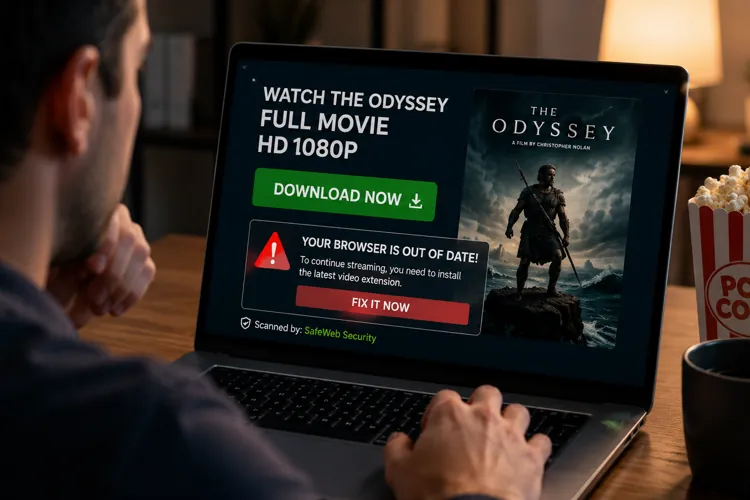

Scammers move fast. Fake download sites appeared within hours of the The Odyssey's film release, attempting to install malware instead of the movie.
Know the warning signs. Avoid ".exe" movie downloads and ignore websites that ask you to install software or click fake browser alerts.
Stream safely. Use legitimate streaming services and keep your security software updated to reduce your risk.
Christopher Nolan's highly anticipated film The Odyssey had barely reached theaters before scammers began exploiting the excitement.
Cybersecurity researchers at Malwarebytes found fake movie downloads and bogus piracy websites appearing within hours of the film's release. Instead of delivering the blockbuster, the scams attempted to trick users into installing malware that could steal passwords, banking information, or even lock up an entire computer with ransomware.
The scams are a reminder that criminals move quickly whenever there's intense interest in a major movie, sporting event, or video game.
Here's how to avoid becoming their next victim.
Never download a movie that ends in '.exe'
One of the biggest red flags researchers found was a file disguised as a high-definition copy of The Odyssey.
It looked like a movie but actually ended with the ".exe" file extension — a Windows program, not a video. Legitimate video files typically end in formats like .mp4, .mkv, or .avi. If your "movie" wants to install software, it's almost certainly malware.
Pro tip: Turn on file extensions in Windows so you can see the real file type before opening a download.
Ignore fake browser warnings
Researchers also discovered convincing pop-ups claiming a browser component was missing and urging users to click "Fix It Now."
The warning wasn't real — it was simply part of the webpage, designed to send visitors through advertising networks that could lead to fake browser extensions, tech support scams, or malware downloads.
Pro tip: If a website tells you to install software just to watch a video, it’s highly recommended to close the page immediately.
Popular movies attract scammers
Criminals know millions of people search online for newly released movies.
That makes blockbuster releases prime opportunities for phishing attacks, fake streaming sites, and malware-laced downloads. The same tactic often appears around major sporting events, hit TV series, and popular video games.
Use legitimate streaming services
Besides reducing any potential legal risks, official streaming platforms obviously reduce the chance of downloading malicious software.
If a movie isn't yet available to stream legally, that's often because it's still in theaters.
Keep your security software up to date
Modern antivirus and browser protection tools can block many malicious websites and downloads before they reach your computer.
While no security software catches every threat, updated protection adds another important layer of defense.