

Stack Amazon’s discount layers. Combine digital coupons, Subscribe & Save discounts, Lightning Deals, and credit card rewards. Using two or three together can often cut prices 30–60%.
Look for hidden coupons. Thousands of items have clip-able coupons, many worth 20–50% off. Try searching phrases like “coupon laundry detergent” to uncover discounts that aren’t obvious.
Pair coupons with Subscribe & Save. After clipping a coupon, add the item to Subscribe & Save for an extra 5–15% off, letting both discounts stack automatically at checkout.
Amazon may not look like a traditional coupon store. But in actuality, Amazon is one of the most coupon-friendly retailers online.
Instead of paper coupons, Amazon uses a layered system of digital coupons, subscription discounts, limited-time deals, and reward stacking.
Once you understand how these layers work, you can regularly cut 30% to 60% off everyday purchases without much effort.
The key is knowing where to find the discounts and how to stack them together.
First: understand Amazon’s five savings layers
Before you start clipping coupons or chasing deals, it helps to actually understand how Amazon’s savings system works.
Think of their discounts like layers in a stack. Each layer represents a different type of promotion, and in many cases, they can be combined.
The most important savings layers are:
- Amazon digital coupons
- Subscribe & Save discounts
- Lightning Deals and limited-time promotions
- Credit card or rewards stacking
- Promotional credits
Most Amazon shoppers only use one of these layers at a time. But the biggest savings happen when two or three are stacked together.
For example, imagine buying a household item priced at $22.
You then clip a 20% coupon, enroll in Subscribe & Save for 15% off, and pay using a 5% Amazon rewards credit card. All of a sudden that $22 item drops to around $14 after everything stacks.
Once you start thinking about Amazon purchases this way, you’ll start to notice opportunities to save almost every time you shop.
Step 1: Start with Amazon’s hidden coupon page
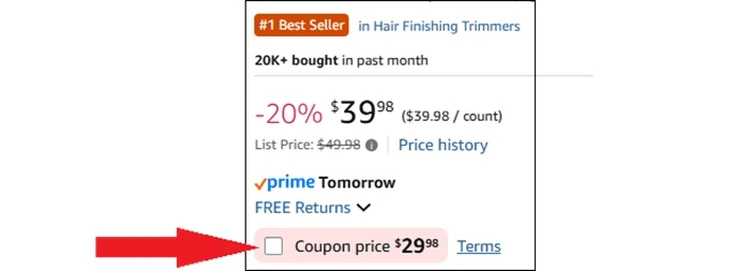
One of the most overlooked areas on Amazon is their digital coupons page. It’s not easy to find this from their homepage as they clearly hide it.
You actually have to filter your search by “Coupons.” The discounts are very solid too. You’ll often find coupons that will get you 20-50% off the original price.
To get the savings, you simply tap the empty box next to “coupon price,” and the discount automatically applies at checkout.
The coupons are typically funded by manufacturers trying to boost visibility for their products. That’s why you’ll often see coupons for brand-name items like:
- Electronics
- Laundry detergent
- Paper towels
- Books
- Vitamins and supplements
- Coffee and snack foods
- Pet supplies
- Beauty products and skincare
- Cleaning supplies
- Home & Kitchen
- Automotive
A simple habit that can save real money is browsing the coupon page once a week and clipping offers on items you buy regularly.
Clipping the coupon doesn’t commit you to purchasing the item. It simply activates the discount so it is ready when you need it.
Pro tip: Not every Amazon coupon is easy to spot. Some are buried in product listings and don’t show up on the main coupon page. One really smart pro tip is to type the word “coupon” into Amazon’s search bar along with the product you’re shopping for.
For example, try searches like “coupon laundry detergent” or “coupon paper towels.” This will quickly surface listings that have clip-able discounts attached.
Step 2: Stack coupons with Subscribe & Save
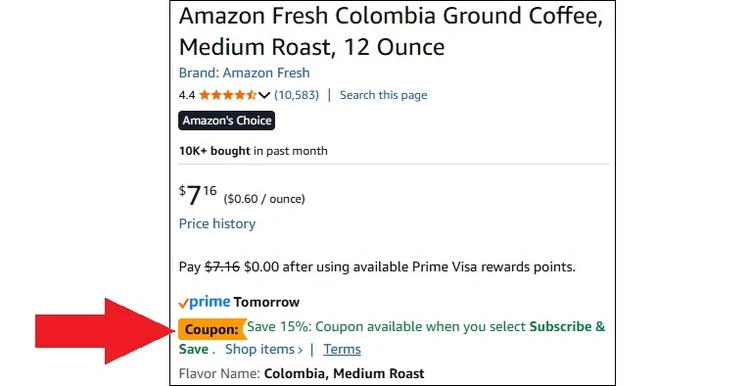
One of Amazon’s most powerful savings tools is the Subscribe & Save program.
At first glance, it appears to simply be a way to automate deliveries for items you buy regularly. But the real advantage is the extra discount Amazon applies to subscription orders.
The discount looks like this:
- 5%-15% off your first Subscribe & Save order of a specific product.
- Up to 15% off when you have five or more subscriptions in the same delivery cycle.
Many everyday household products are eligible, including:
- Coffee and pantry staples
- Diapers and baby supplies
- Protein bars and snacks
- Trash bags and paper products
- Pet food
- Shampoo and toothpaste
The biggest advantage is that Subscribe & Save discounts stack with coupons.
For example:
- Item price: $19.99
- Coupon clipped: 25% off
- Subscribe & Save discount: 15%
- Final Price: about $12.74
That’s some decent savings for stuff your household buys every month anyway.
And you can cancel or skip subscriptions anytime (without penalty) — even immediately after the first delivery arrives.
Savvy Amazon shoppers will basically use Subscribe & Save as a one-time discount tool.
Pro tip: If you want to trigger the 15% maximum discount, add several low-cost subscriptions to the same delivery cycle. After your order ships, you can cancel the ones you don’t want.
Step 3: Watch for Lightning Deals

Amazon runs thousands of limited-time promotions every day. They go by names like Lightning Deals, Today’s Deals, or Gold Box Deals.
These deals are especially popular because they offer steep discounts for a short period of time or until inventory sells out.
The deals frequently cut prices by 20% to 50%, but they can also be hard to find from the Amazon homepage.
From the homepage, or on the Amazon app, look for a link to “Today’s Deals” near the top of the page.
For some odd reason, that link does not always exist, so you might have to look for the “Shop Today’s Deals” section which includes an image of a product (see screenshot above).
And yes, Lightning Deals can often stack with other coupons.
For example:
- Regular price: $35
- Lightning Deal price: $24
- Clipped coupon: 20% off
- Final price: $19.20
Because Lightning Deals are limited, they can sell out quickly.
If you’re planning to buy something specific, checking the deal section daily can help you catch price drops before they disappear.
Step 4: Stack your credit card rewards too
Another discount layer many shoppers overlook is your payment method.
Certain credit cards offer solid cash back on your Amazon purchases.
Popular examples include:
- Amazon Prime Visa – 5% cash back
- Discover – Rotating categories that sometimes include Amazon
- Chase Freedom cards – Occasional bonus promotions
Even if you’re already using coupons and deals, these cards add another 5% discount on top.
Amazon also runs periodic promotions encouraging shoppers to use reward points.
Examples include:
- 30% off when using Membership Rewards points.
- $10–$60 discounts for applying just one credit card point.
The trick is that you don’t need to spend a lot of points.
Often, applying just a single reward point triggers the promotional discount.
Pro tip: Watch for Amazon promotions that say “Use one point and save 30%.” These promotions appear several times per year and can produce huge savings.
Step 5: Take advantage of promotional credits
Amazon frequently offers promotional credits for completing small actions.
Common examples include:
- Choosing No-Rush Shipping
- Trying Amazon Music or Kindle promotions
- Watching Prime Video promotions
- Purchasing digital content
These credits usually range from $1 to $10 and they are for one-time use only. So, if you return the item that you used a promo credit to buy, you won’t get the credit back — it’s gone forever.
While the credits may seem small, they tend to add up quickly.
Many shoppers will accumulate credits they don’t even realize they have, so be sure to check your balance.
You can check your promotional balance in your Account, then select Your Credit & Benefit Balances, which is under Shopping Programs and Rentals.
Pro tip: Whenever you’re not in a hurry for delivery, be sure to select No-Rush Shipping. Amazon often rewards this choice with $1–$3 promotional credits.