
Rufus in the Amazon app can track the price of any item and can even 'Auto Buy' for you if you’re a Prime member
Turn on Amazon app notifications, open the product page, tap “Ask Rufus,” set your target price or % drop, and wait for the alert
Use alerts to pre-stalk big sales, restock household staples at a good price, and slow down impulse buys
Imagine telling Amazon, “Notify me when this TV drops below $499,” and then going back to your life. Well, that’s basically what Rufus price alerts do and they can save you time and money.
Rufus is Amazon’s AI shopping assistant built into the app and website. It can show price history, set price alerts, and even auto-buy something for you once it hits your target price.
Below is a step-by-step guide that you can use to start setting price alerts on Amazon and only buy when the price is right.
First, make sure you’re familiar with Rufus (and notifications on)
The first thing you need to do is get familiar with Rufus and where you’ll access the AI tool on the Amazon app and website.
Where Rufus lives:
- In the Amazon app (iOS/Android), look for a little Rufus logo with colorful chat bubbles or the “Ask Rufus” button. You’ll find both on individual product pages as well as near the bottom of the screen.
- Also, on Amazon.com, you can find Rufus near the search bar at the top or on individual product pages. But you CANNOT set price alerts on the website, only via the Amazon app.
Turn on notifications first (or this whole thing is pointless):
- Open the Amazon app → Account → Settings → Notifications.
- Also, make sure app notifications are allowed for Amazon in your phone settings and that shopping/price notifications are enabled in the app.
- If notifications are off, Rufus can track the price, but you’ll never see the alert.
To make price alerts happen, you don’t need a special subscription beyond a basic Amazon account. But if you want to use the Auto Buy feature, you’ll need to be a Prime member.
Method #1 – Manually set your price alert
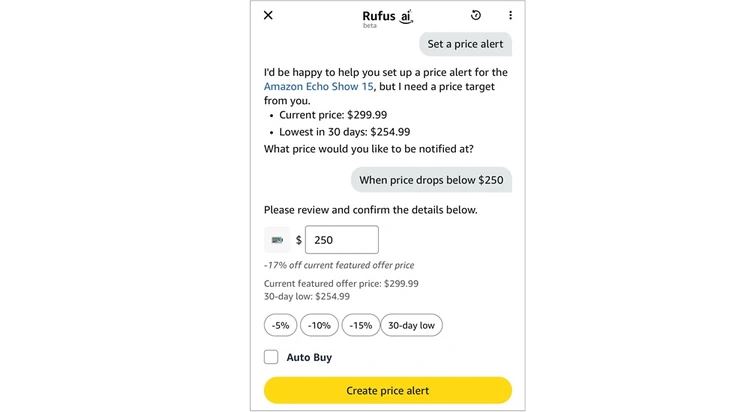
This is the “tap it and go” manual method that many of you will probably use.
- Open the Amazon app.
- Go to the exact product page you care about and make sure you’ve selected the right size/color/configuration first, because alerts are tied to that specific product version.
- There currently is not a “Set price alert” button on the product page. You actually need to open Rufus first and type “Set price alert.”
- Rufus will then show you the current price of the product as well as the 30-day lowest price.
- You’ll then be asked “What price would you like to be notified at?” You just type the price you want to pay.
- Rufus will then pull up a price alert “review” and give you a couple other alert options that you can choose if you like.
- At this point, you can also select Auto Buy if you’re a Prime member. When you check the Auto Buy box, Amazon will actually buy the item for you once it reaches your pre-selected price point.
- Last, tap Create price alert and you’re done.
Once that’s set, Rufus will check every 30 minutes for price changes and send you a notification when it hits your target.
Pro tip: When using Auto Buy, Amazon automatically places the order using your default payment method and default shipping address. And don’t worry, you’ll get notified that the order has been placed and you have a 24-hour cancellation window to change your mind. Also, be aware that auto-buy requests stay active for up to six months or until you cancel them.
Method #2 – Just ask Rufus to set the alert
You can also talk to Rufus directly via your phone to set up your price alert.
Here’s how to make it happen:
- Open the product page in the Amazon app.
- Tap the Rufus icon / “Ask Rufus” button.
- Tap the microphone icon and say something like:
- “Set a price alert for this if it drops below $500.”
- “Let me know if this falls 15%.”
- “Set a price alert at $16.99 and auto-buy it when it hits that price.”
- Rufus will then confirm the item, your target price or percentage-off, and whether you want Auto Buy.
Behind the scenes, talking to Rufus does the same thing as manually typing “Set price alert”, it just feels a little more tech-savvy.
How to actually find your price alerts
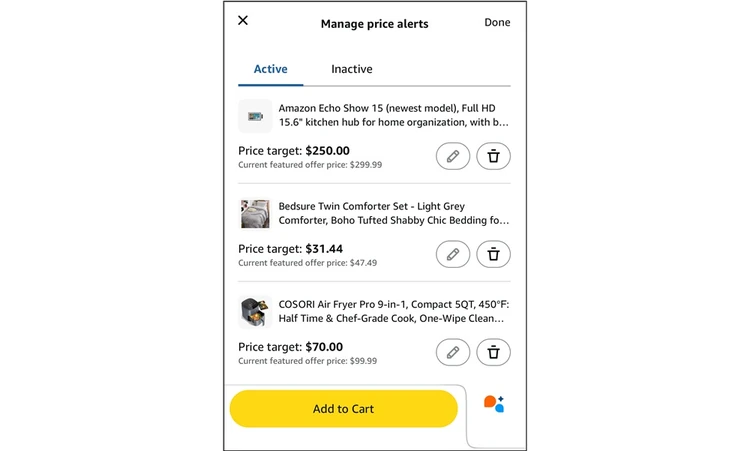
As is the case with many features on Amazon, they don’t always make things easy to find.
As a matter of fact, when using their website (not the app), they make it impossible to find the price alerts that you’ve previously set up.
Here’s exactly how to find your price alerts:
- On the Amazon app, tap the three horizontal lines (menu) at the bottom, then Account, then in the Orders section tap on Your Price Alerts, then Manage Price Alerts.
- Even easier when using the app, you can simply tap Rufus and say “Manage my price alerts” and you’ll get instant access to them.
- On the website, you’re out-of-luck. As of right now, you can only access your price alerts via the Amazon app. I verified this with an Amazon rep after a lengthy phone call. Hopefully they’ll fix this in the near future.
Once you find your price alerts, you can tweak them how you want or cancel them altogether. This is also the spot where you can turn Auto Buy on or off.
Smart ways to actually use Rufus alerts
Here a few of my favorite ways to use these price alerts to save money in real-life:
Pre-sale stalking:
Before big shopping days like Prime Day / Black Friday / Cyber Monday, set price alerts on your “maybe” or “wish” items. Then let Rufus do the tracking instead of you refreshing your cart 40 times.
Stock-up strategy:
For stuff my family buys over and over (things like detergent, pet food, razor refills), I like to set a reasonable price target and then let Auto Buy do the work for me whenever the price is right. It saves me a lot of time and I know I’m always getting a deal.
Impulse-control hack:
If you train yourself to only buy when Rufus hits your target price, you’ve basically turned every “I want it now” purchase into “I’ll wait for a real discount.” Think of this as a built-in cooling-off period and it often keeps your impulse purchases under wraps.