

Many drivers searching Google for DMV services are accidentally landing on third-party websites that charge extra fees for renewals and paperwork help.
The confusion happens because sponsored search results often appear above the official DMV website and look surprisingly official.
Experts recommend skipping sponsored results, looking for “.gov” websites, and checking carefully for any added processing fees.
In the digital age, it makes total sense that millions of Americans would go online and renew their vehicle registrations, replace licenses, and even deal with DMV paperwork.
But in doing so, many drivers go to Google and search phrases like:
- “DMV registration renewal”
- “Renew license plates”
- “Vehicle registration online”
…and they’re ending up on third-party service websites instead of their actual state DMV website.
These companies are not necessarily pretending to be the DMV or operating illegally. Most even clearly disclose they are third-party services that help process registration paperwork — for a fee.
The problem is that many consumers do not realize that when they click on it. Especially because the sites typically appear as a sponsored Google result above the official DMV listing.
Why people get confused
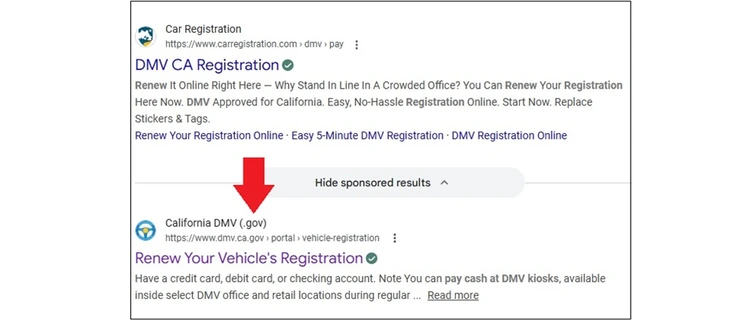
To many drivers, especially less tech-savvy consumers, the sites can look and feel extremely similar to government websites.
They often include:
- DMV-related wording
- Professional-looking layouts
- Registration and renewal tools
- State references
- Official-sounding language
And because people naturally trust the first result they see, many assume they are already on the official DMV website.
That confusion can become expensive.
Where the extra fees show up
Many third-party DMV service sites charge:
- Processing fees
- Convenience charges
- Service markups
- Expedited handling fees
In some situations, consumers may pay $20 to $80 more than they would directly through their state DMV.
Sometimes the extra cost may be worth it for people who want annual renewal help, faster service, help with paperwork, or need registration assistance.
But many drivers only realize afterward that they paid extra for something they could have done directly through the DMV for less.
Why seniors are especially vulnerable
Older Americans are often more likely to get caught up in the confusion of this.
They tend to be more likely to:
- Click the first Google result
- Miss the small “Sponsored” label
- Assume professional sites are official
- Feel overwhelmed by online government websites
On smartphones, the confusion gets even worse because URLs are much harder to see, and sponsored ads blend in very easily.
For many consumers, especially seniors, the difference between a government website and a private processing company is not very obvious at all.
Google’s role in the confusion
Part of the issue is how modern search results work.
Sponsored ads now closely resemble regular search listings. The only real distinction is usually a small “Sponsored” or “Sponsored result” label many users barely notice.
That means a paid third-party registration service can appear above the actual DMV website simply because it purchased the ad placement.
And many consumers incorrectly interpret “top result” as an “official result.”
How to avoid unnecessary DMV fees online
Consumer experts recommend slowing down anytime you are dealing with government services, registration renewals, taxes, passports, and driver’s licenses.
A few simple habits can save you money and reduce the confusion considerably.
Look for “.gov”
Official DMV websites almost always use “.gov” at the end of the web address.
If the website ends in:
- “.com”
- “.org”
- “vehicle services”
- “registration processing”
…it is likely a private third-party company.
Again, that does not automatically mean the company is dishonest. It simply means additional fees will usually apply to your purchase.
Skip sponsored results when possible
Whenever you do this type of business online, know that there will be sponsored ads at the top of search results hoping you’ll click on them. The safest move is to get in the habit of immediately scrolling past the sponsored ads and finding your actual state DMV website.
Also, consider bookmarking your state DMV website once you find it so you never have to search for it again and run the risk of clicking on the wrong link.
Always read checkout screens carefully
Before paying, look closely for:
- Processing fees
- Convenience charges
- Service markups
- Subscription offers
Some consumers do not realize the total cost difference until the final payment screen.
Avoid a lot of future headaches by getting in the habit of slowing down and taking a minute to make sure the website you’re on is the site you think.