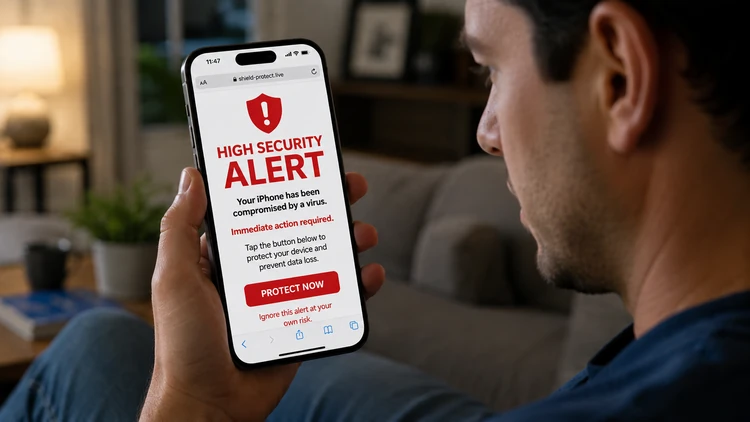

Cybercriminals are exploiting Apple’s reputation with fake “high alert” security warnings designed to panic consumers into giving up passwords, payment information, or remote access to their devices.
The scam often appears as pop-up alerts, text messages, or phone calls claiming an iPhone, iCloud, or Apple ID has been compromised.
Experts say the best defense is to avoid clicking links in unsolicited alerts and verify any security issue directly through Apple’s official channels.
The Microsoft Tech Support Scam has cheated thousands of consumers out of millions of dollars over the years. Lately, scammers have switched brands, posing as another well-known tech company.
Consumers are reporting a surge in fraudulent “Apple High Alert” messages that attempt to trick people into believing their iPhone or iCloud account has been hacked. The scam uses fear and urgency to pressure victims into acting quickly, often leading them to hand over sensitive information or even allow criminals to take control of their devices.
Cybersecurity experts say the scheme has become increasingly sophisticated, with scammers mimicking Apple branding, logos, and language so convincingly that even experienced users can be fooled.
How the scam works
The scam typically begins with an alarming message claiming that suspicious activity has been detected on the victim’s Apple account. Consumers may receive:
A pop-up warning while browsing the web
A text message claiming an Apple ID has been locked
An email about unauthorized purchases
A phone call from someone pretending to be Apple Support
Many messages include phrases such as “High Alert,” “Security Breach Detected,” or “Your iPhone Has Been Compromised.”
The warning often urges consumers to click a link, call a phone number immediately, or download software to “secure” the device.
Once victims respond, scammers may attempt to:
Steal Apple ID usernames and passwords
Collect credit card or banking information
Install remote-access software
Gain access to photos, contacts, and stored passwords
Demand payment for fake technical support services
In some cases, criminals convince consumers to purchase gift cards or transfer money to supposedly “protect” their accounts.
Why the scam is effective
Apple products are widely trusted, and many consumers worry about losing access to photos, financial accounts, and personal data stored on their devices. Scammers exploit that anxiety by creating a sense of emergency.
Fraudsters know that panic causes people to make quick decisions. If a message tells someone their account is under attack, they may be more likely to react before thinking critically.
The scam also succeeds because fake alerts can look remarkably authentic. Some fraudulent websites closely resemble Apple’s official support pages, complete with logos and professional-looking formatting.
Warning signs consumers should watch for
Security experts say there are several red flags that can help consumers identify the scam.
Apple does not:
Send unsolicited pop-up alerts asking users to call support numbers
Ask for passwords or verification codes through text messages
Request payment via gift cards or wire transfers
Pressure users to act immediately to avoid account deletion
Consumers should also be suspicious of:
Poor grammar or unusual wording
Unknown phone numbers or email addresses
Links that do not lead to Apple.com
Loud alarm sounds or flashing warnings in browser pop-ups
How to protect yourself
Do not click links, download software, or call numbers provided in unexpected messages claiming to be from Apple.
If concerned about account security, consumers should independently visit Apple’s official website or use the Settings app on their iPhone to check for notifications.
Two-factor authentication adds an extra layer of protection to Apple IDs and can help prevent unauthorized access.