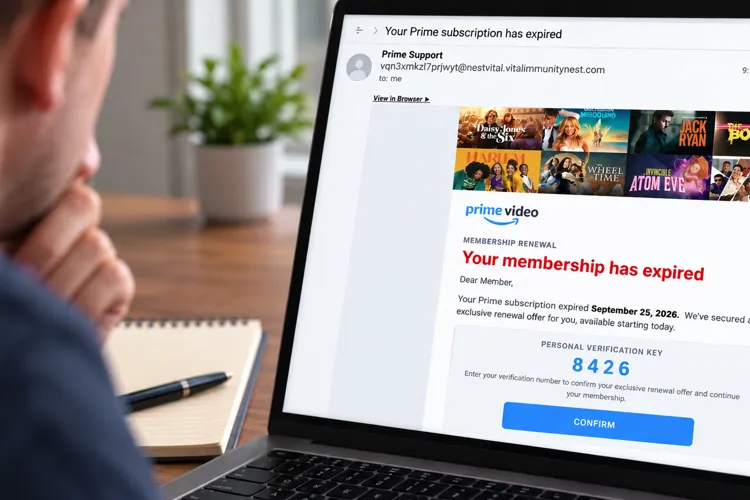

It looks like Amazon: The email uses Prime Video branding, current shows, and a polished membership-renewal notice that could easily pass for the real thing at a glance.
The sender gives it away: The message says it's from “Prime Support,” but the actual email address has nothing to do with Amazon.
Don't use the button: If you're worried about your Prime membership, go directly to Amazon's website or app rather than clicking a link in an unexpected email.
I've seen my share of scam emails, and I'll admit a recent one made me look twice.
An email that landed in my inbox this week appeared to come from Amazon Prime Video and warned me that my membership had expired. It looked surprisingly legitimate.
The email had the Prime Video logo, images of popular shows, professional-looking graphics, and even a four-digit “Personal Verification Key” that I was supposed to enter to confirm an “exclusive renewal offer.”
There was just one problem. Actually, there were several.
Amazon has previously warned about membership-renewal scams in which criminals impersonate legitimate companies and try to convince consumers to provide credit card information. Amazon says email remained the most common way U.S. customers reported encountering Amazon impersonation scams in 2025.
Here's what gave this one away.
1. Look beyond the sender's name

At first glance, the email appeared to come from “Prime Support.”
But clicking on the sender information revealed the actual email address: vqn3xmkzl7prjwyt@nestvital.vitalimmunitynest.com
Not to sound overly obvious here, but that's a pretty big clue that Amazon didn't send it.
Amazon specifically recommends checking the actual sender rather than trusting the display name. Legitimate Amazon emails use an Amazon email domain.
2. Apparently, my membership expired in the future

This was my favorite clue.
The email told me: “Your Prime subscription expired September 25, 2026.”
I received the email on September 21.
Unless Amazon has figured out time travel, my membership couldn't have expired two days from now.
It's a good reminder to slow down and actually read suspicious emails instead of reacting to the big red warning telling you something has gone wrong.
3. Amazon apparently forgot my name
Despite supposedly knowing enough about my account to know when my membership expires, the email begins simply:
“Dear Member,”
That doesn't automatically make an email fraudulent, but combined with the bizarre sender address and impossible expiration date, it's another reason to be suspicious.
4. The “verification key” makes it feel official
One of the smartest parts of this scam is the prominent four-digit “Personal Verification Key.”
Mine was 8426.
It creates the impression that the offer was generated specifically for my account and gives you another reason to interact with the message.
But Amazon warns that impersonation scams commonly use account problems and urgent requests to get consumers to hand over account or payment information.
5. Don't click anything — including “View in Browser”
This is where the email got me and where I made a mistake.
At the top of the email was a seemingly harmless “View in Browser” link. I clicked it, thinking I'd get a better look at the message or maybe it would take me to the Amazon website.
Don't do that.
“View in Browser” is still a link controlled by whoever sent the email. Clicking it can take you away from the relative safety of your inbox and onto a website controlled by scammers. At a minimum, clicking a unique link may also confirm that your email address is active and that someone is engaging with the message.
The same rule applies to the big blue CONFIRM button farther down the email. I didn't click that one.
If an email claims there's a problem with your Prime membership, don't use any link in the message to investigate. Even one that looks as innocuous as “View in Browser.”
Instead, open the Amazon app or type Amazon's web address into your browser yourself and check your account there.
These tricks aren't limited to Amazon
Scammers impersonate retailers, banks, and other familiar companies.
Here’s the playbook when an unexpected email lands in your inbox:
Check the real sender address: Don't trust the display name. Expand the sender information and look at the actual email address.
Don't trust the branding: Logos, product photos, and professional-looking graphics are easy for scammers to copy.
Watch for urgency: Expiring memberships, suspicious purchases, refunds, and delivery problems are common ways to get you to act quickly.
Don't click any links: Even harmless-looking links like “View in Browser,” “Track Package,” or “Get Refund” can lead somewhere you don't want to go.
Verify it yourself: Open the company's app or type its website into your browser and check your account there.
And Amazon isn't the only big-name scammers impersonate. FTC data found Best Buy and Geek Squad generated the most impersonation reports in 2023, followed by Amazon and PayPal.
The logos, graphics, and formatting may look 100% perfect. But it’s the small details where scammers often slip up and show their cards.