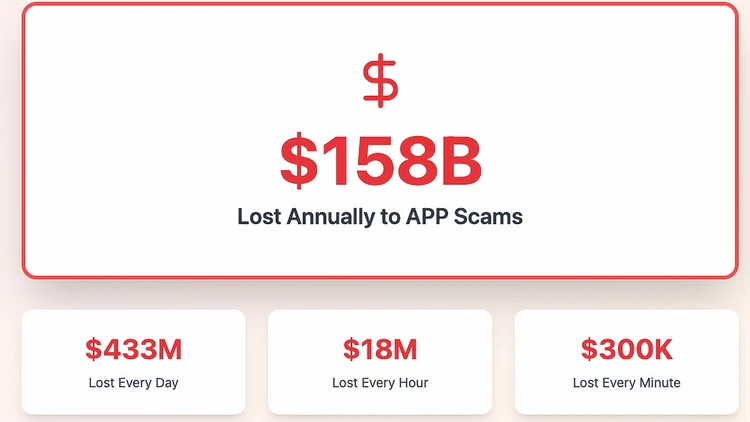

APP scams are fast-moving scams that leave consumers perplexed and bewildered. They happen quickly and trick victims into using Authorized Push Payment (APP) apps, which often don't have any way to recover lost sums. They add up quickly, with $158 billion lost annually.
Here's some information to help you stay safe from APP scams.
What is an APP scam?
It’s when a scammer tricks you into voluntarily sending money—via Zelle, Venmo, Cash App, wires, ACH, crypto, or gift cards—by pretending to be someone you trust (a bank rep, retailer, government agency, employer, or family member).
Why are APP scams so effective now?
Faster payments settle quickly, and scammers use AI voice clones, spoofed caller IDs, and realistic websites to create urgency and credibility.
Common APP scenarios
“Bank fraud” text/call urging you to move money to a “safe” account.
“Tech support” pop-up that installs remote-access software.
“Family emergency” voice clone asking for instant help.
“Marketplace” or “job” overpayments with a request to refund.
“Utility/government” shutoff threats demanding same-day payment.
“Invoice change” emails that quietly swap a vendor’s bank details.
Are APP losses covered?
Protections vary. Because you authorized the transfer, you may not get automatic reimbursement. Still: report immediately—banks can sometimes recall funds, and many now review “fraudulently induced” payments and may refund as a courtesy or under internal policy.
If you already sent money, what should you do first?
Call your bank/card issuer immediately (use the number on the back of your card/statement).
Ask for an urgent payment recall and an investigation of the receiving institution.
If a card number was used, request a chargeback.
If an account was compromised, freeze/close it and change passwords/2FA.
Save all evidence (texts, emails, usernames, transaction IDs, screenshots).
File reports with the FTC (ReportFraud.ftc.gov) and your state attorney general.
What if a scammer asked for your one-time passcode (OTP)?
That’s a red flag. Treat the account as compromised: change passwords, revoke app access, reset 2FA, and review recent transactions.
How can I avoid APP scams?
Pause and verify using a phone number or website you look up yourself.
Never move money to a “safe account.” Banks do not ask you to do this.
Don’t trust caller ID, profile pics, or email display names—confirm on a second channel.
Set lower daily limits for P2P and wires; require approval for new payees.
Use account alerts for logins and transfers.
With family or a small business, agree on a shared passphrase for money requests.
Print this APP checklist and keep it handy
Spot the red flags
Urgent threats (“account frozen,” “utility shutoff,” “lawsuit today”).
Requests to move money to a “safe/holding” account.
Payment demanded via Zelle/P2P, wire, crypto, or gift cards.
New or changed bank details in a vendor invoice.
Requests to share one-time passcodes or install remote-access apps.
Messages that forbid you to hang up or call back.
Before you pay
Pause. Scammers weaponize urgency.
Verify on your own. Call your bank/vendor using a number you look up.
Dual-confirm money requests (phone + email/text).
Check payee details letter-by-letter; send a tiny test transfer only after verified.
Set limits & alerts on P2P, wires, and new payees.
Use a family/business passphrase for any “emergency” requests.
If you think it’s a scam (during the contact)
Hang up / close the chat.
Do not click links or download software.
Do not share one-time codes, PINs, or full SSN.
Take screenshots for evidence.
If you already sent money
Call your bank now (number on card/statement).
Ask for an urgent recall and investigation of the receiving bank.
If a card was used, request a chargeback.
Secure accounts: change passwords; enable/refresh 2FA; remove unknown devices/sessions.
Report it:
FTC: ReportFraud.ftc.gov
Identity theft: IdentityTheft.gov
State attorney general: (find via NAAG.org)
Phone/text scams: file at the FCC
Document everything: dates, times, numbers/handles, transaction IDs, screenshots.
Follow up with your bank; keep ticket numbers and escalation notes.
Ongoing protection
Review monthly statements; dispute suspicious charges quickly.
Keep devices updated; use a password manager.
Educate family/staff—especially about voice clones and invoice-change scams.