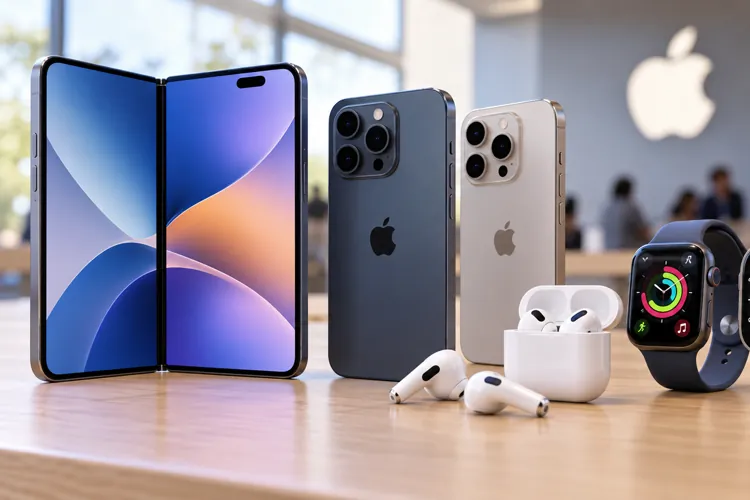

Apple unveiled its latest gadget lineup on Wednesday, September 9, headlined by its first foldable iPhone, the $1,999 iPhone Duo.
The iPhone 18 Pro and Pro Max aren't getting any cheaper, starting at $1,199 and $1,299, respectively.
Before buying Apple's latest gadgets, consider older models, competing trade-in offers, carrier promotions, and refurbished devices to potentially save hundreds.
Apple just gave consumers plenty of shiny new reasons to open their wallets.
The company unveiled its latest lineup on Wednesday, September 9, including new iPhones, Apple Watches, and AirPods.
But the biggest headline from the event is the foldable iPhone Duo which opens up to a 7.6-inch display, the largest screen ever offered on an iPhone. With a starting price tag of $1,999, though, it costs roughly the same as a premium Apple laptop.
And Apple's more traditional new iPhones aren't exactly bargains either. The iPhone 18 Pro starts at $1,199, while the iPhone 18 Pro Max starts at $1,299 — $100 more than last year's starting prices.
So here’s what's new, and more importantly, how you can avoid paying full price.
What Apple actually announced
Here's a quick look at some of the biggest products Apple unveiled Wednesday:
iPhone Duo: Apple's first foldable iPhone and the star of the show. It starts at $1,999 and opens book-style to reveal a much larger display.
iPhone 18 Pro: Starts at $1,199, $100 more than last year's Pro, and features Apple's new A20 Pro chip, upgraded cameras, and expanded AI capabilities.
iPhone 18 Pro Max: Starts at $1,299, also up $100, with the A20 Pro chip along with camera, battery, and AI improvements.
Apple Watch Series 12: Apple's newest mainstream smartwatch gets upgraded health and fitness features, including improvements to heart-rate and recovery tracking.
Apple Watch Ultra 4: The company's high-end rugged watch also gets upgraded sensors and health and fitness features.
AirPods 5: Start at $129, with noise cancellation now available at that price. A $149 version adds wireless charging and on-stem volume controls.
That's a lot of new Apple gear, and potentially a lot of money. Before you rush to preorder anything, here are seven ways to potentially keep more of that money in your pocket.
1. Apple's best deal today? Don't buy anything
This one definitely wasn't mentioned during Apple's presentation.
Before dropping $1,999 on an iPhone Duo, or buying any of Apple's other new gadgets, ask yourself one question: What will this new device let me do that my current one can't?
If your iPhone still gets software updates, the battery is healthy, and the camera does everything you need, another year of ownership could be the biggest Apple discount you'll find.
And if battery life is the only thing making your phone feel old, compare the price of replacing the battery with the cost of buying a $1,000-plus new phone.
Apple's job is to make the device you already own suddenly feel outdated. Your job is to figure out whether it actually is.
2. Let someone else buy Apple's newest model
Here's another easy way to save after an Apple event: Buy yesterday's technology.
The newest iPhones will get all the attention, which can make older models much more interesting to bargain hunters. However, you may find that last year's iPhone does 90% of what you actually need for hundreds of dollars less.
And don't assume Apple itself will have the best deal. Be sure to check wireless carriers and major retailers as they start making room for Apple's newest devices. Older inventory can be where some of the best deals emerge after a new generation arrives.
3. Make the carriers fight for your business
If you're determined to buy one of Apple's new iPhones, don't preorder until you've compared carrier promotions.
Trade-in and switcher deals can potentially knock hundreds of dollars off a new phone.
But don't let a giant "FREE iPhone" headline make the decision for you. Some of the biggest discounts require a qualifying trade-in, adding a new line, switching carriers, or signing up for a more expensive unlimited plan.
Your discount may also arrive as monthly bill credits spread out over two or three years. That means the number you really need to compare isn't just the price of the phone. It's the total cost of your wireless service over the entire promotion.
A free iPhone isn't much of a bargain if you're paying an extra $40 every month for a plan you don't need.
4. Don't automatically trade your old iPhone to Apple
Sure, Apple Trade In is convenient. But that doesn't necessarily mean it'll get you the most money.
Before handing over your old iPhone, get several quotes. Specifically, compare Apple's offer with your wireless carrier and reputable phone-buying services. If you're willing to put in more effort, check what comparable phones are actually selling for on resale marketplaces.
If selling your old phone yourself gets you an extra $150, that's effectively another $150 off your new one.
Just be careful when selling directly to another person. Understand the marketplace's seller protections and don't hand over or ship your phone until you understand exactly how you'll be paid.
5. Check Apple's refurbished store before buying new
There's another section of the Apple Store that's easy to overlook: Certified Refurbished.
These aren't simply random used gadgets someone returned. Apple says its refurbished products undergo full functional testing and come with a one-year warranty.
The catch is inventory, or the lack thereof. You won't always find the exact model, storage capacity, or color you want.
But if you're shopping for an iPhone, Mac, iPad, or Apple Watch and don't need the latest and greatest, be sure to check Apple's refurbished inventory before paying full price.
6. Have a college student in the family? Don't miss this
This one is particularly timely as most colleges and universities are back in session. Apple's 2026 college promotion runs through Sept. 24, giving eligible shoppers another couple of weeks to take advantage.
The promotion combines Apple's education pricing with Apple Gift Cards on certain Macs and iPads. Eligible purchases include a $150 Apple Gift Card with a MacBook Pro, $100 with a MacBook Air, and $100 with an eligible iPad Air or iPad Pro.
And the program isn't only for students. Parents purchasing for eligible college students also qualify, along with faculty and staff at qualifying educational institutions.
If someone in your family qualifies, be sure to check the Education Store before paying the regular Apple Store price.
7. Don't pay hundreds for storage you won't use
This is where an already expensive Apple product can get really expensive. It's easy to configure a new iPhone and think, "I better get more storage just in case I need it."
Instead of guessing, grab your current iPhone and go to Settings → General → iPhone Storage. At the top of the screen, you'll see exactly how much storage you're using and what's taking up the most space.
If you've owned a 256GB phone for three years and you're only using 100GB, there's probably little reason to spend significantly more for 512GB on your next phone.
The same strategy applies when configuring a Mac or iPad. Buy the storage you realistically need, not the storage you imagine you might need someday.
Don't let Apple Event excitement make the decision
Apple events are designed to make new technology look irresistible.
The cameras get better. The chips get faster. The screens get bigger, and now they have an iPhone that folds. Exciting stuff for Apple fans, even if Samsung beat it to the punch with the Galaxy Fold way back in 2019.
And suddenly the perfectly good iPhone in your pocket starts to feel like it belongs in a museum.
Before you rush out and pre-order something, give yourself a day to compare Apple's trade-in value, carrier promotions, refurbished products, and prices on older models.
Because with Apple's newest iPhone pushing the $2,000 mark, taking a little time to shop around has never made more sense.